For agencies, consultancies and dev shops of 5 to 20 people

Leads for every niche you sell to, checked for fit, hunted, not bought, ranked best first, ready to message

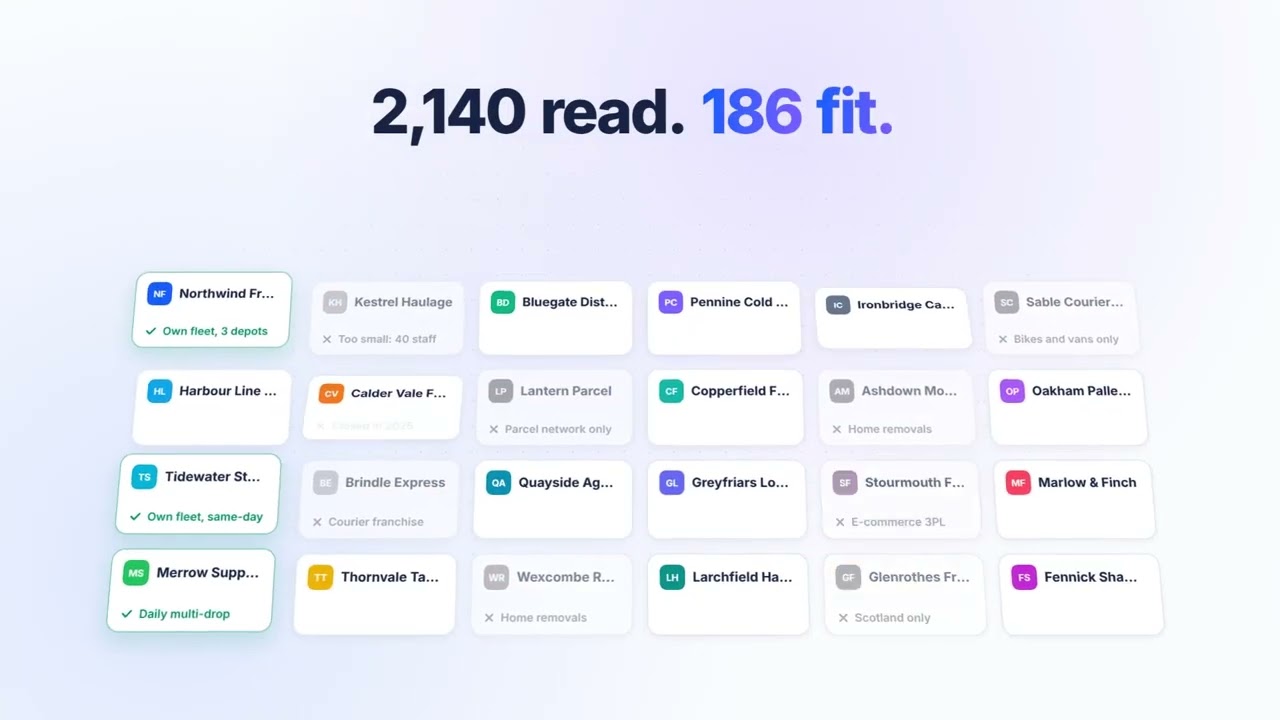
You’ve got several offers and a small team. Tell the hound who each offer is for. It finds the niche lists those buyers are on, reads every company’s website to check they fit, and finds the right person on LinkedIn. You press send.

Truffle Hound is invite-only while we’re in early access. Apply and we’ll be in touch.

Every offer needs its own list. Nobody has time to build them.

You run outreach all the time, in between client work. A database gives you the same names everyone else is messaging. So someone spends Friday cleaning a spreadsheet, and 7 in 10 LinkedIn connection requests still aren’t accepted.*

You don’t need more names. You need the right ones for each offer.

*Expandi analysed 13.2 million LinkedIn connection requests sent between May 2025 and April 2026 and found 28.5% were accepted. Expandi, LinkedIn Outreach Benchmarks 2026.

What that looks like

Say you’re a ten-person dev shop that builds booking systems for physio clinics.

A database gives you every company with “physio” in its name. The hound finds the professional body’s clinic directory, opens each clinic’s website, checks which ones still take bookings by phone, and only then finds the practice owner on LinkedIn.

Next offer, next niche. Same hound.

Watch the hound work

Seventy seconds. One sentence about who you sell to goes in. A ranked shortlist of leads and a week of messages come out.

Searches that work

Run one search for each offer. Name the sector, location, company size and the roles you want. The hound finds the companies first, then the decision makers inside them.

  • “Purchasing decision makers at independent UK pet retailers”
  • “Operations directors at UK manufacturers with 50 to 500 staff”
  • “IT managers at UK GP practices”
  • “Founders of B2B SaaS startups that launched on Product Hunt recently”

Vague searches like “companies that might need us” bring back vague results. More tips in the FAQ.

How the hound works

Five jobs that eat your team's week. It does four of them.

  1. Picks up the scent

    Search by company or by person. "UK manufacturers with 50 to 500 staff." "Ops directors at UK manufacturers." It hunts trade associations, industry directories and award lists, as well as Google and LinkedIn, then reads each company’s website to check the fit.

  2. Scores them out of 100

    Every lead gets a sniff score and the reason behind it. Only the best make the list, ranked best first.

  3. Lines them up

    Connection note, first message, chaser and sign-off. Written for each lead and scheduled across your week.

  4. You press send

    One click per lead, from your own LinkedIn, at a daily limit you set. Nothing goes out on autopilot.

Every lead gets a sniff score out of 100

Other tools hand you names. Truffle Hound hands you a ranked shortlist, and shows its working.

Example lead
Operations director, plastics manufacturer. Midlands.
91/100
  • Company fit36/40
  • Role and seniority23/25
  • Signs they need you now18/20
  • Easy to reach14/15
  • 180 staff across three UK sites, right in your range
  • Runs operations, so owns the problem you solve
  • Company is hiring two planners this month

An example, not a real person.

How does it compare with Apollo, Dripify, Sales Navigator or ChatGPT on its own? See the full comparison.

FAQ

Will this get my LinkedIn account restricted?

The risky tools are the ones that send on autopilot, all day, from servers you don't control. Truffle Hound doesn't. You press send on every connection, from your own browser, and you set your own daily limit. It looks like you because it is you.

Where do the leads come from?

Wherever your best customers are listed. The hound finds specialist sources, like trade associations, industry directories and award lists, as well as Google and LinkedIn searches. It reads each company's website to check the fit, then finds the right people on LinkedIn. It doesn't sell you a database.

Can I search by company as well as by person?

Yes. Search for companies first, by sector, size or location, and the hound finds the right person inside each one. Or search for people directly, by role and seniority.

What does the sniff score actually measure?

How well the company fits your customer, whether the person's role means they can buy, any signs they need you now, and how easy they are to reach. It adds up to 100, and every score comes with the reasons in plain words. Around 70 and above counts as qualified.

How specific should I be?

Very. Say the sector, location, company size and the exact roles you want. "Purchasing decision makers at independent UK pet retailers" works. "People in the pet industry" doesn't.

We already pay for Apollo. Why add this?

Keep it if it works for email. Truffle Hound does a different job. It finds and checks people on LinkedIn, scores each one and writes the messages, so nobody spends Friday cleaning a list.

How many invites should I send?

You choose. The default is 20 to 25 a day. We recommend around 150 a week at most, depending on how active you are on LinkedIn and how many days a week you send. If you're very active you can go a little higher, but err on the side of caution. You press send on every one, so nothing goes out on autopilot.

Is it only LinkedIn?

Yes. It's built for LinkedIn.

What does it cost?

We're in beta and haven't set a price yet. Early access teams help us set it.

More tips in the FAQ.

Apply to join

Truffle Hound is invite-only while we’re in early access. Apply and we’ll be in touch.